Showing posts with label android. Show all posts

Monday, 18 April 2016

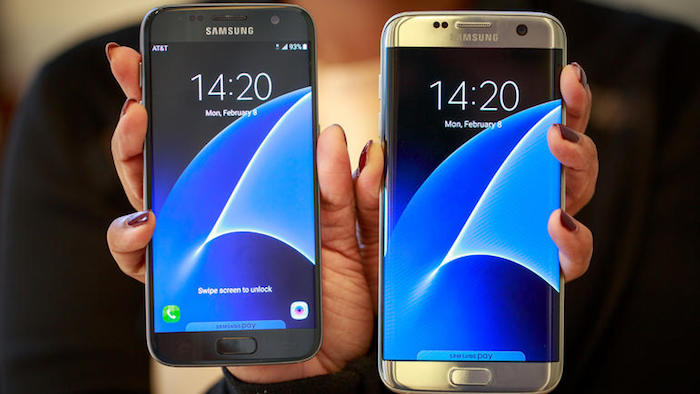
SAMSUNG GALAXY S7


BUY HERE AT BEST PRICE - Samsung galaxy S7
SPECIFICATION 
Samsung Galaxy S7 packs a 12-megapixel primary camera on the rear and a 5-megapixel front shooter for selfies. 

The Samsung Galaxy S7 runs Android 6.0 and is powered by a 3000mAh non removable battery. It measures 142.40 x 69.60 x 7.90 (height x width x thickness) and weighs 152.00 grams. 

The Samsung Galaxy S7 is a dual SIM (GSM and GSM) smartphone Connectivity options include Wi-Fi, GPS, Bluetooth, NFC, 3G, 4G (with support for Band 40 used by some LTE networks in India). Sensors on the phone include Proximity sensor, Ambient light sensor, Accelerometer, and Gyroscope. 
About Samsung 
Founded back in 1969 as Samsung Electric Industries, Suwon, South Korea-headquartered Samsung Electronics today makes everything from televisions to semiconductors. It released its first Android smartphone in 2009, and can be credited with the launch of the first Android tablet back in 2010. The company is among the biggest players in the smartphone market in the world. It has recently developed smartphones running Tizen OS, as an alternative to its Android-based smartphones.

Samsung Galaxy S7 detailed specifications
GENERAL
Release dateFebruary 2016
Form factorTouchscreen
Dimensions (mm)142.40 x 69.60 x 7.90
Weight (g)152.00
Battery capacity (mAh)3000
Removable batteryNo
SAR valueNA
DISPLAY
Screen size (inches)5.10
TouchscreenYes
Resolution1440x2560 pixels
Pixels per inch (PPI)577
HARDWARE
Processor1.6GHz  octa-core
RAM4GB
Internal storage32GB
Expandable storageYes
Expandable storage typemicroSD
Expandable storage up to (GB)200
CAMERA
Rear camera12-megapixel
FlashYes
Front camera5-megapixel
SOFTWARE
Operating SystemAndroid 6.0
CONNECTIVITY
Wi-FiYes
Wi-Fi standards supported802.11 a/ b/ g/ n/ ac
GPSYes
BluetoothYes, v 4.20
NFCYes
InfraredNo
USB OTGYes
Headphones3.5mm
FMNo
Number of SIMs2
SIM 1 
GSM/ CDMAGSM
3GYes
4G/ LTEYes
Supports 4G in India (Band 40)Yes
SIM 2 
GSM/ CDMAGSM
3GYes
4G/ LTEYes
Supports 4G in India (Band 40)Yes
SENSORS
Compass/ MagnetometerYes
Proximity sensorYes
AccelerometerYes
Ambient light sensorYes
GyroscopeYes
BarometerYes
Temperature sensorNo

Wednesday, 2 March 2016

3 best Fitness apps for Android! 2016

Hello!! ... In this post I'm going to tell you about some real cool apps which will help you during your workout and even after that also. As we see most of us wants to stay fit and fine have dream body ... and we just want to maintain ourselves .....Most of the guys wants to have Six Pack Abs.... girls want that real sexy body... so this post is all of you people!!! 


1. C25k - 5k Running Trainer -


 ★ The OFFICIAL C25K® (Couch to 5K) program ★
- Millions of success stories!
- The only 5K training app to be partners with MyFitnessPal for seamless integration.
- Featured on Glamour Magazine, Yahoo!’s Appolicious, Popsugar Fitness, Apple’s “What’s Hot”, Apple’s “New & Noteworthy”, and many more!
- Doctor recommended on healthTap.com

≈ Real-Life Inspirational Transformations ≈
- Over 100,000 Likes and 1000 Success Photos at http://facebook.com/C25Kfree
- Our community inspires one another (and inspires us!) everyday. Hear some of their amazing stories.


Lose weight with MyFitnessPal, the world’s most popular health and fitness app! With the largest food database by far (over 6,000,000 foods), our amazingly fast and easy to use calorie counter help you take those extra pounds off! And it’s FREE – no strings attached. There is no better diet app – period. 

WHAT'S NEW

It’s officially 2016 and New Year’s resolutions are in full swing. We decided that even the MyFitnessPal app could use a few healthy changes this month, so this release is full of bug fixes and performance updates. Say hello to a faster and more reliable MyFitnessPal.
We hope you enjoy and happy tracking!


Discover a new and exciting way to get motivated, lose weight, and stay in shape. Play with friends, earn rewards, defeat challenges, and track your progress on the largest fitness mobile interactive game of its kind. 


Monday, 29 February 2016

Android 7.0 "N" Leaks and details


We might be months away from the release of Google's next Android OS version but a new screenshot may have offered the first look at the Marshmallow successor.
Android's official Developer site now lists a screenshot for showing Day-Night theme in system setting. Notably, the page for turning-on/ off Bluetooth includes a hamburger setting on the top left which has been so far unavailable in any of Android OS versions - indicating that it may have offered the first look at the next version.
The screenshot was first spotted by Android Police. The addition of hamburger button in Android N points to a side navigation drawer that is likely to have all Settings sections listed, making it easier to switch between them. Currently, users have to go back into main settings page before jumping to another Settings section.
settings_screenshot_marshmallow_android_n.jpg
Google is likely to reveal its next mobile operating system, believed to be called as Android N initially, at the I/O conference. Google CEO Sundar Pichai had last month has announced the date and venue for the I/O 2016 which will be held in Mountain View, California on May 18 through May 20. Much like Android 6.0 Marshmallow, Android N can be expected to be launched later this year with the new Nexus hardware.
Unfortunately, it's too early to comment on the design changes or tweaks that Google is expected to make in its next Android N build. But we can expect to get more of such details in bits in future.
So far, Google has revealed that Android N won't ship with Oracle's proprietary Java application programming interfaces. The company has confirmed that it will utilize OpenJDK, an open source version of Oracle's Java Development Kit.
An earlier report claimed that Google will finally include split screen multi-tasking support in Android N, the next major version of Google's operating system. Google's Andrew Bowers, Director for Consumer Hardware, had previously talking about Android N had said, "We're working on lots of things right now for N that, of course, we wish we had, you know, yesterday. But we'd spoil the surprise of N if we shared all of them. Split screen is in the works!"
GUYS Comment down below the Name you would like to give to the Upcoming Android OS... 

Wednesday, 24 February 2016

BEST Android Launchers march 2016!

Launchers are the way Android users customize their smartphone and tablet experience. There's superficial stuff, like changing screen transitions, icons, and fonts, but the best Android launchers out there enable users to tweak the device's behavior to suit their daily usage, so long as you're willing to put the time into defining those customization. You can make your home screens as simple or complicated as you wish, while tweaking every little detail or just taking what's given to you by default — but either way you can replace what your phone's manufacturer gives you with the install of a single app.
If you're looking for a change of pace from the out-of-box software experience on your phone, consider a new launcher. We've found the best ones available today, and listed all of the pros and cons of each.

1. ACTION LAUNCHER

Action Launcher
Action Launcher is a great option that mixes things up and changes the interface paradigm from what you'd expect in a "normal" launcher. There's no regular dock and app drawer, instead replacing it with a slide-in drawer to house your apps. You also get Shutters and Covers, which give you innovative ways to launch into folders and widgets with swipes — it's all about getting to your apps and content quicker.
The newest version, Action Launcher 3.5, takes things up to a new design that fits in with Android 5.0 Lollipop, and introduces a few new features as well. There's a free version of Action Launcher for everyone to try, with a pro upgrade costing just $4.99 — and after you figure out the time-saving features you'll want to unlock it.
It's fair to say that Action Launcher is one of our favorites as well as being one of the very best.
Download here - Action Launcher

2. GOOGLE NOW LAUNCHER


The Google Now launcher is the obvious pick for anybody looking for a pure, clean Android experience. It comes right from Google (and is pre-installed on Nexus phones), so you can shear away anything the manufacturer has loaded up in one install. Transitions are quick and clean, and there's nothing superfluous getting between you and your apps and widgets. Beyond that, the left-most home screen becomes Google Now, so you can launch into searches, view cards populated based on the time of day, your location, and general browsing habits, and execute all sorts of hands-free "OK Google" commands. The only real downside here is that you won't be able to enjoy the level of customization available on more robust launchers — you get what Google gives you here Download it here - Google Now launcher

3. NOVA LAUNCHER

Nova Launcher
Nova is a massively popular launcher that offers a whole bunch of animation options, folder views, and desktop behaviors. If you shell out $4.00 for the premium upgrade you can program gestures to perform certain actions, and fully customize unread badges including corner radius, border, background and text color. One particularly cool addition is swipe actions, which allow app icons to act as a folder with a swipe, or a standard app launch with a tap. If that's not enough, you can always explore the wide world of Nova-compatible themes in Google Play to dramatically change the look and feel of your Android device. You'll even find some Android 5.0-style options tucked away in Nova.
Nova is a highly functional launcher that can be as subtle or as loud as you like, making it completely unique if you spend the time.

4. APEX LAUNCHER

Apex Launcher
Apex offers a similar range of functions as Nova. You can tweak the icon tray size and scrolling, change animations, adjust home screen behaviors, and customize gesture commands for various pinches, taps, and swipes. A plug-in allows notification data to be fed to Apex from a variety of apps, and out to any Android Wear devices, too, so long as you're willing to upgrade to the pro version for $4.49. There are a wide range third party themes available in the Google Play Store which let you change the overall look of your Android experience, but as a functional core, Apex does extremely well.
Android power users will have a field day with the Apex launcher
PLEASE comment down below ..What are your favorite launchers ... AND PLEASE SUBSCRIBE GUYS 

Tuesday, 16 February 2016

"Mazar Malware" that can Wipe your Android!! "spread via SMS"


A Danish company has detected an attempt to spread POWERFUL form of Android Malware via TEXT MESSAGE !!!


HI guys ..in this post i will tell you about this "MAZAR MALWARE" and also tell you ...how can you Prevent it!! 

Mazar can gain administration rights on your phone. Allowing it to access your Android Smartphones and wipe your handset, Read text messages and make a call!


GOOD NEWS for android users of RUSSIA ..this malware will not affect any device in which the OS language has been set to Russian!

Additionally users have to unchecked all the default settings which allow "download app from any source" and should be set to "download from trusted source"

this believed to be the first time that MAZAR has been wide spread " Real World ATTACK" 

User receives an innocuous- looking text providing a link to what looks like a Multimedia message!!


This link will automatically download TOR software which enables the device to connect to the enormous internet connections to the phone!!

ADVICE TO USERS ! 
The advice to users is to never tap on web links in text messages from unfamiliar phone numbers and to be cautious of links even if the message appears to be from a known contact since sometimes this can be spoofed.