Showing posts with label android apps. Show all posts

Sunday, 13 March 2016

Android N Features! CONFIRMED !


The first Android N developer preview is now out and it gives us a sneak peek into what Android 7.0 will eventually look like when it arrives officially later this year. Of course, developer previews quite often contain features that won’t make it to the final release, but there’s still plenty to get excited about, so let’s dive right in. Here are all the confirmed, rumored and expected Android N features, with a particular focus on what currently exists in the first Android N preview update. Please note that some features have been officially confirmed by Google, while others, “confirmed” by the developer preview, could still disappear before Android 7.0.

Confirmed Android N features

Android N release date: now! 


Rather than wait until Google I/O 2016 – Google’s annual developer conference, which begins on May 18 – Google decided to surprise us all by releasing the first Android N developer preview on March 9, two full months earlier than expected. The Android N preview went live for the Nexus 6P, Nexus 5X, Nexus 6, Nexus 9 (Wi-Fi and LTE), Nexus Player and Pixel C on theAndroid Developers site. A more polished version of the Android N developer preview will still be shown off during Sundar Pichai’s keynote lecture on day one of the conference but developers and enthusiasts will have a couple months’ head start on getting to know N.

Google surprised us by releasing N developer preview earlier than expected ! 

The final Android 7.0 release date has been confirmed for Q3, 2016, giving Google until September 30 to make good on its timeline. This means that the Nexus 6P (2016) and Nexus 5X (2016) – or whatever they will be called this year – will be coming a little earlier than expected too, as the new version of Android is always presented alongside new Nexus devices.
The Nexus 4 was announced on October 29, the Nexus 5 on October 31, the Nexus 6 on October 15, the Nexus 5X and 6P on September 29. So we might even see this year’s Nexuses earlier in September rather than the end of the month if the progressively earlier announcement dates are anything to go by.
The final Android 7 release will be limited to Nexus devices at first and make its way to other manufacturer devices and carrier networks over the following six months or so. You can download the Android N preview below and flash it on a compatible device right now but be sure to consult the list of known issues first.

1 - Multi-window mode

The first official Android N feature to be confirmed was multi-window mode, with the confirmation coming, obscurely enough, via a Reddit AMA with the Pixel C team a few months back. During the discussion, Andrew Bowers confirmed that “split screen is in the works” and with the release of Android N developer preview 1, we can now see exactly how Android 7.0 split screen mode will look.
Compatible apps (developers will need to add support for split screen mode individually) can be opened up side-by-side in Android N and resized. Developers will be able to set a minimum size for their app windows, but you’ll have a very similar multitasking experience to what you already find on many OEM devices. There’s also a new picture-in-picture mode that works just like minimized video in YouTube.

2 - New Android N settings menu

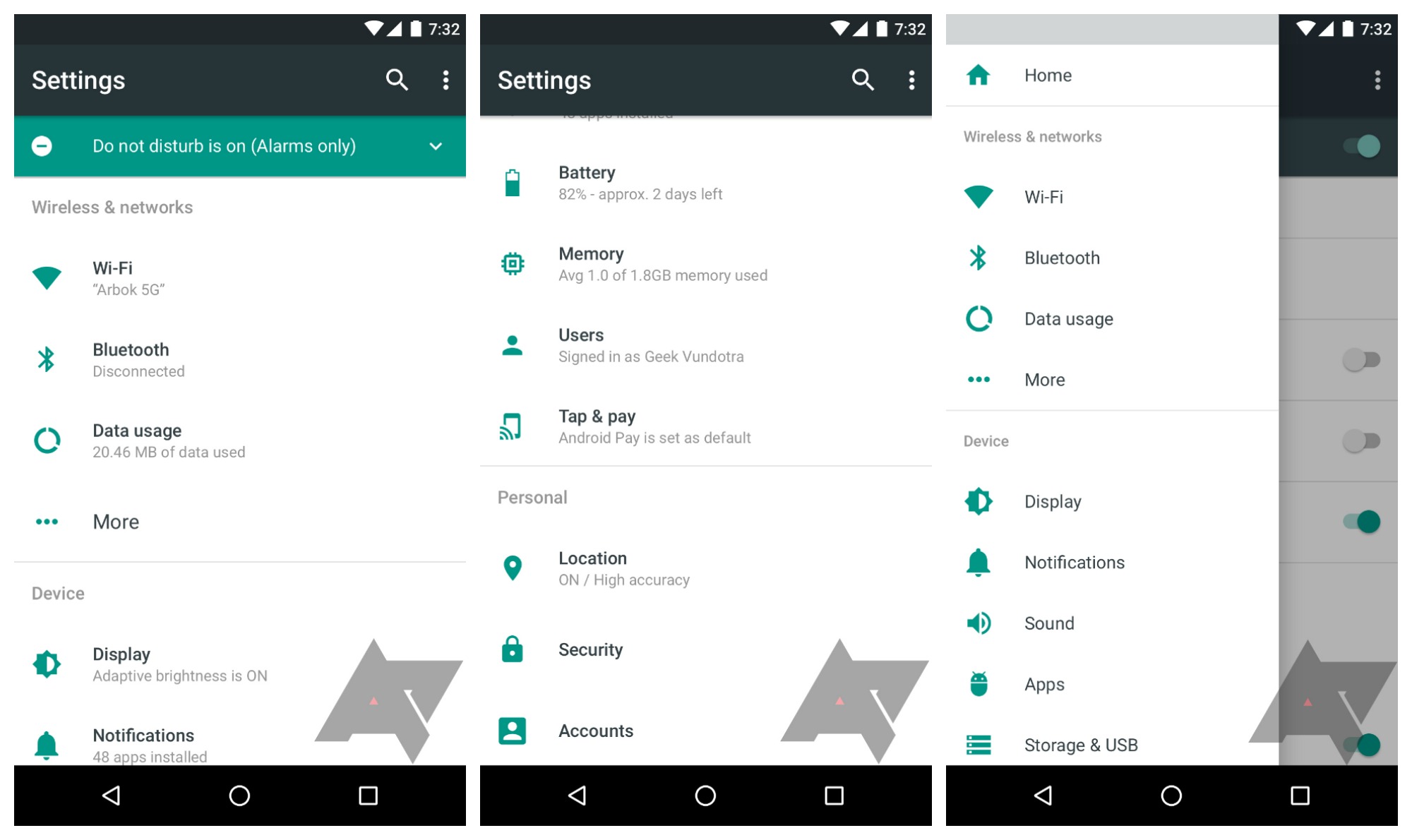
Android N delivers a revamped settings menu too. The changes include the addition of a Suggestions drop-down section at the top and removal of the individual section dividers. One of the best changes though is that you can now see basic details of each section in the main Settings menu. So, for example, rather than have to enter the Wi-Fi menu to see which network you’re connected to, Android N displays that information in the top-level settings menu. It’s an obvious time-saving idea and is kind of surprising it has taken this long to appear. Sound and Notifications have now been given their own dedicated sections too, rather than being grouped together like in Marshmallow.
The hamburger menu returns and has now been explained, providing a swipe-out nav drawer that simply reproduces the top-level settings menu sections. While it’s debatable if it is any better than just tapping the back arrow when you’re one level into a menu, it will provide a quick escape route to the main settings when you’re several levels down in sub-menus. Of course, the presence of the hamburger menu in Android N also does away with the duplicated actions of the back arrow in the settings and the back arrow in the nav bar.
3 - Enhanced Doze Mode - Read here for in-depth review

4 - Revamped notification shade/quick settings panel  - Read here in detail

5 - Change display size in Android N - Read here in detail


Subscribe to my blog... for more info which is yet to come. I will keep on updating this post so stay tuned! 


Wednesday, 24 February 2016

BEST Android Launchers march 2016!

Launchers are the way Android users customize their smartphone and tablet experience. There's superficial stuff, like changing screen transitions, icons, and fonts, but the best Android launchers out there enable users to tweak the device's behavior to suit their daily usage, so long as you're willing to put the time into defining those customization. You can make your home screens as simple or complicated as you wish, while tweaking every little detail or just taking what's given to you by default — but either way you can replace what your phone's manufacturer gives you with the install of a single app.
If you're looking for a change of pace from the out-of-box software experience on your phone, consider a new launcher. We've found the best ones available today, and listed all of the pros and cons of each.

1. ACTION LAUNCHER

Action Launcher
Action Launcher is a great option that mixes things up and changes the interface paradigm from what you'd expect in a "normal" launcher. There's no regular dock and app drawer, instead replacing it with a slide-in drawer to house your apps. You also get Shutters and Covers, which give you innovative ways to launch into folders and widgets with swipes — it's all about getting to your apps and content quicker.
The newest version, Action Launcher 3.5, takes things up to a new design that fits in with Android 5.0 Lollipop, and introduces a few new features as well. There's a free version of Action Launcher for everyone to try, with a pro upgrade costing just $4.99 — and after you figure out the time-saving features you'll want to unlock it.
It's fair to say that Action Launcher is one of our favorites as well as being one of the very best.
Download here - Action Launcher

2. GOOGLE NOW LAUNCHER


The Google Now launcher is the obvious pick for anybody looking for a pure, clean Android experience. It comes right from Google (and is pre-installed on Nexus phones), so you can shear away anything the manufacturer has loaded up in one install. Transitions are quick and clean, and there's nothing superfluous getting between you and your apps and widgets. Beyond that, the left-most home screen becomes Google Now, so you can launch into searches, view cards populated based on the time of day, your location, and general browsing habits, and execute all sorts of hands-free "OK Google" commands. The only real downside here is that you won't be able to enjoy the level of customization available on more robust launchers — you get what Google gives you here Download it here - Google Now launcher

3. NOVA LAUNCHER

Nova Launcher
Nova is a massively popular launcher that offers a whole bunch of animation options, folder views, and desktop behaviors. If you shell out $4.00 for the premium upgrade you can program gestures to perform certain actions, and fully customize unread badges including corner radius, border, background and text color. One particularly cool addition is swipe actions, which allow app icons to act as a folder with a swipe, or a standard app launch with a tap. If that's not enough, you can always explore the wide world of Nova-compatible themes in Google Play to dramatically change the look and feel of your Android device. You'll even find some Android 5.0-style options tucked away in Nova.
Nova is a highly functional launcher that can be as subtle or as loud as you like, making it completely unique if you spend the time.

4. APEX LAUNCHER

Apex Launcher
Apex offers a similar range of functions as Nova. You can tweak the icon tray size and scrolling, change animations, adjust home screen behaviors, and customize gesture commands for various pinches, taps, and swipes. A plug-in allows notification data to be fed to Apex from a variety of apps, and out to any Android Wear devices, too, so long as you're willing to upgrade to the pro version for $4.49. There are a wide range third party themes available in the Google Play Store which let you change the overall look of your Android experience, but as a functional core, Apex does extremely well.
Android power users will have a field day with the Apex launcher
PLEASE comment down below ..What are your favorite launchers ... AND PLEASE SUBSCRIBE GUYS 

Monday, 15 February 2016

Handy Gesture app For Android!!

Hi there guys... In this post i'll be telling you one really cool tip....
"how you can add Gestures" to your Android Smartphones! 


This can work on both smartphones with "physical buttons" and "virtual buttons" ...


And the name of the app you require is "All In One Gesture" ..You can download this app here All in One Gesture . 


Once you get this app on your device you are ready to go.....just open it up ..and configure it as per your requirement ..and "A cool" thing will be added to your smartphone!! 


Give it a try guys ...and please let me know.. did you all like or not!!! 

Friday, 12 February 2016

SAVE 50% Data on Youtube and Netflix videos!!

Hi there....in this post i'll be telling you ..that "How exactly you can save 50% data while watching Youtube and Netflix videos!" 


If you watch a lot of videos on YouTube and Netflix ..then guys you will going to love this thing....we all know Watching videos on internet from our Smartphones costs a lot.  BUT now you can save exactly half of the data that you spend on videos ...obviously we will be needing a Third-Party app. 


If you are an Android user ..then here you go...
And the app is called " Opera Max" ....lets go back in our past for a couple of moments ... we used a Internet browser for phone called OPERA MINI which saved our lots of data...this app "Opera Max" is by Opera...

Just install this app on your smartphone and customize the setting...like if you want your cellular data to be saved you can select it in the settings ..or if you want your Wi-Fi data to be saved you can opt for it too...and yes of course you can check it for both. 


This app runs on a background and saves a lot of data. This apps also serves as a VPN (Virtual Private Network).

IN NETFLIX 
when you click on a video ..it might take a while like (3-8) seconds ..but once the loading is done... the video runs fine. Yes i would say that there is a slight compression in the video quality ..but according to me it won't affect your watching experience!!! ...Download Netflix here

IN YOUTUBE 
once you click on a video it starts in 2-3 seconds ...In the beginning the quality will be slight fuzzy but in just 20 seconds quality will become fine. 480p . 

Opera Max comes with a control panel so obviously you can monitor you data usage...that how much it has been used and how much it has saved ...for different apps like YouTube, Netflix, browser etc.  And you can make changes accordingly .


I use this app and ... i would say give it a try it surely saves at least 50 % data that means " IT CAN SAVE MORE" ..

You can get this app here - Opera Max

Wednesday, 10 February 2016

Apps that can Enhance your Android Smartphone Experience !!!

Hello people!!! ...

Today i'l be telling you'll about some really good "third-party" apps ..that can enhance your Android Smartphone Experience!!! and some camera apps that can give a spark to your android photography experience ...!!! 
 
1. Quickpic -

 Nowadays we see that most of the android device currently running on Android 6.0 Marshmallow lacks Gallery !!! ...so we face a lot of problems accessing our gallery checking our pictures and videos....FINALLY you don't have to worry about it now...there is an app called "Quickpic" which helps you to access  pictures and videos on your device.... TO DOWNLOAD this app click here "Quickpic"

2. LightFlow :

 It's the second in our list and one of my favorite app which i like to have in my phone. Though we all have an LED notification functionality on our phones but...the same kind of LED notification sometimes is not a fun!! ..yeahhh....Now you can customize your LED notification with the help of an app called "LightFlow". this app will help you to customize the LED notification settings as per your wish!! TO DOWNLOAD this app click here "LightFlow"


is an app which is according to me a very helpful app because i mostly work on my computer and so...i don't often check whether there are some notifications on my phone or not....and if you guys face the same problem NEED NOT TO WORRY because your app is here ...PUSH BULLET enables you to get all the notification of your phone On your computer screen and the BEST part is that you can respond directly from your computer ....whether it's a What'sapp text or a SMS or email or anything....YOu just need to install "PUSHBULLET" on your smartphone and then you need to install a COMPANION APP on your computer and ..once you are done you are ready to go ..now you no need to check your phone again and again for notification ..you will be notified on your computer screen!! TO DOWNLOAD this app click here "PushBullet" 

4. GloveBox :

 If you guys run multiple apps at the same time and you need to jump from one app to the other..you just keep on minimizing the one and opening the other....but with this app what you'll can actually do is jump from one app to the other without minimizing the one and opening the other.... GLOVEBOX enables you to shuffle between your apps without a problem and ..it's quite a nifty app ...It PUts a sidebar on your device and can customize the settings accordingly. TO GET THIS APP click here "GLOVEBOX" 


 I think most of you guys know about this app and i will not talk much about this app here but ...for newbies, YOu guys can Transfer file between your computer and your smartphone all you need to do is just Put the IP you see on your smartphone in your computer match it up  create a network and you're done !! ...to  GET THIS APP HERE "AIRDROID" 


 I think not only me but even most of the people in their day to day life need to scan documents and mail it or do whatever they want to ....so people ..you need not to have a scanner you can do it with your Smartphone's camera ...using the "CamScanner" this app allows you to convert any written text on paper or any picture into a PDF file ...just open this app click a picture and it will automatically convert it to PDF file which you can use for your work. To GET THIS APP CLICK HERE "CamScanner" 

7. CameraMX :

 all the Smartphone Photographers out there ...guys this app is for you'll . we know that many smartphone have their default camera app a very basic one. To add more to it all you just have to do is have this camera CameraMX on your phone ..it allows you to put editing option in real time to what you are about to click! GET THIS APP HERE "CameraMX" 


SO guys these were some of the apps that I find useful and..i hope even you'll will find it useful please try them out on your smartphones and comment down below ..whether you like it or not!! SUbscribe for more Stuff like this !