SUBSCRIBE


 Posts
All Comments
Posts
All Comments
Showing posts with label android 2016. Show all posts
Showing posts with label android 2016. Show all posts
Tuesday, 12 April 2016


Monday, 7 March 2016
7 Best Apps For March 2016!!
Hello! Everyone, In this post I will be sharing a list of TOP 10 BEST APPS .... The apps listed below are really very useful and you all gonna like it ..too!!!
Like always I wanna say... If you guys have info about some really cool app please mention it below in the COMMENT section.... I would love to give it a try... Thankyou!

Now coming to the list of top 7 Apps...
1. SQUAREHOME 2 (launcher) -

SquareHome 2 is the best launcher with metro UI of Windows 10.
It's easy to use, simple, beautiful and powerful.



"Everalbum, a challenge to Google and Dropbox for storing photos online" -- WIRED
"Bringing the emotion back to photos" -- The Next Web
Everalbum protects your life's photos so you never have to worry about losing them. Across devices and photo sources, Everalbum automatically backs up your photos and videos so you can access them at any time. You can then free up space on your device by removing photos from your camera roll.

Like always I wanna say... If you guys have info about some really cool app please mention it below in the COMMENT section.... I would love to give it a try... Thankyou!
Now coming to the list of top 7 Apps...
1. SQUAREHOME 2 (launcher) -

SquareHome 2 is the best launcher with metro UI of Windows 10.
It's easy to use, simple, beautiful and powerful.
Main features:
- Vertical scrolling in page and horizontal scrolling from page to page.
- Perfect metro style UI and tablet support.
- Beautiful tile effects.
- Showing notifications and count on tile.
- Smart app drawer : sorts the best on the first by using patterns of app.
- Quick access to your contacts.
- Plenty options for customization.
- Vertical scrolling in page and horizontal scrolling from page to page.
- Perfect metro style UI and tablet support.
- Beautiful tile effects.
- Showing notifications and count on tile.
- Smart app drawer : sorts the best on the first by using patterns of app.
- Quick access to your contacts.
- Plenty options for customization.
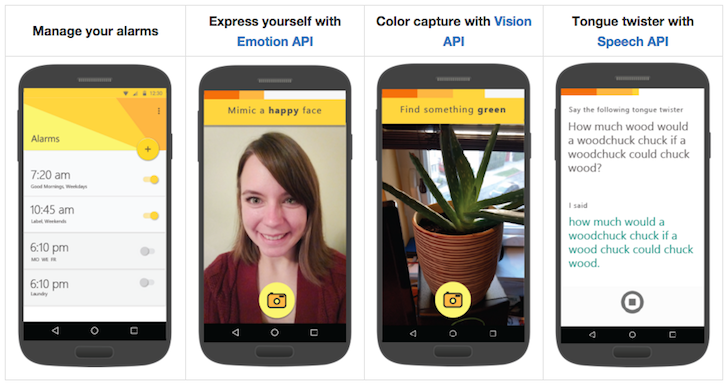
Mimicker Alarm, a Microsoft Garage Project, is a free morning alarm clock app that helps you wake up from sleep and stay up by playing a simple alarm game, called a "Mimic". To dismiss your alarm in the morning, you must mimic the action given. We might ask you to snap a selfie, speak a phrase, or even get out of bed! The Mimic games require you to be awake, alert, smart, and use your self and your surroundings, so be ready to move when your alarm fires.
Watch out – if you don’t finish the game in time, we’ll assume you’ve fallen back to sleep and your alarm will start ringing again. Once you complete the Mimic and successfully dismissed your alarm, share your personalized results with your friends to show how you woke up and beat the clock.
Features include:
* First run experience to help you learn how to use Mimicker Alarm
* Alarm customization for time, day, ringtone, snooze, and Mimic
* Choice of snooze or dismiss for each alarm
* Multiple Mimics to wake up every morning with: Match the expression, capture the color, complete the tongue twister, or shuffle between all three
* Personalized images you can share with friends after each alarm
* First run experience to help you learn how to use Mimicker Alarm
* Alarm customization for time, day, ringtone, snooze, and Mimic
* Choice of snooze or dismiss for each alarm
* Multiple Mimics to wake up every morning with: Match the expression, capture the color, complete the tongue twister, or shuffle between all three
* Personalized images you can share with friends after each alarm

Search inside your keyboard!
/FEATURES
• Contacts
• Foursquare
• Giphy
• Google
• Maps
• New York Times
• Pin
• Recent
• Soundcloud
• Spotify
• Twitter
• Youtube
• Custom Slashes
…and plenty more!
• Contacts
• Foursquare
• Giphy
• Maps
• New York Times
• Pin
• Recent
• Soundcloud
• Spotify
• Youtube
• Custom Slashes
…and plenty more!
"I stare at the horizon every night before I sleep hoping to catch a glimpse of the lighthouse.The light reminds me of Grandpa and my summer visits playing on the cliffs. That warm life saving beacon not only saves ships, it keeps me safe too. Grandpa’s there just across the water watching over me.
But the lighthouse hasn't shone now for days and the fog is thick! What's happened? It's time to visit Grandpa!"
Beneath the lighthouse is a serene puzzle action game about a boy in search of his lost Grandpa. Your journey will take you through mysterious mechanical wheels that lay beneath the lighthouse!
-This game is free to play or can be unlocked to a premium experience-
Learn Python in the most social and fun way, with SoloLearn!
Learn Python, one of today's most in-demand programming languages on-the-go, while playing, for FREE! Compete and collaborate with your fellow SoloLearners, while surfing through short lessons and fun quizzes. Practice writing Python code within the app, collect points, and show off your skills.
When you complete the course, you'll win a Certificate of Completion as a trophy!
When you complete the course, you'll win a Certificate of Completion as a trophy!
The SoloLearn Learn Python Course covers the following topics:
• Python Basics
• Data Types
• Control Structures
• Functions and Modules
• Exceptions
• Working with Files
• Functional Programming
• Object-Oriented Programming
• Regular Expressions
• ...and even more!
• Python Basics
• Data Types
• Control Structures
• Functions and Modules
• Exceptions
• Working with Files
• Functional Programming
• Object-Oriented Programming
• Regular Expressions
• ...and even more!
So don’t wait; dive right in! Start coding with Python!
"One of the Fastest Growing Photo Apps Worldwide in 2015" -- App Annie
"Everalbum, a challenge to Google and Dropbox for storing photos online" -- WIRED
"Bringing the emotion back to photos" -- The Next Web
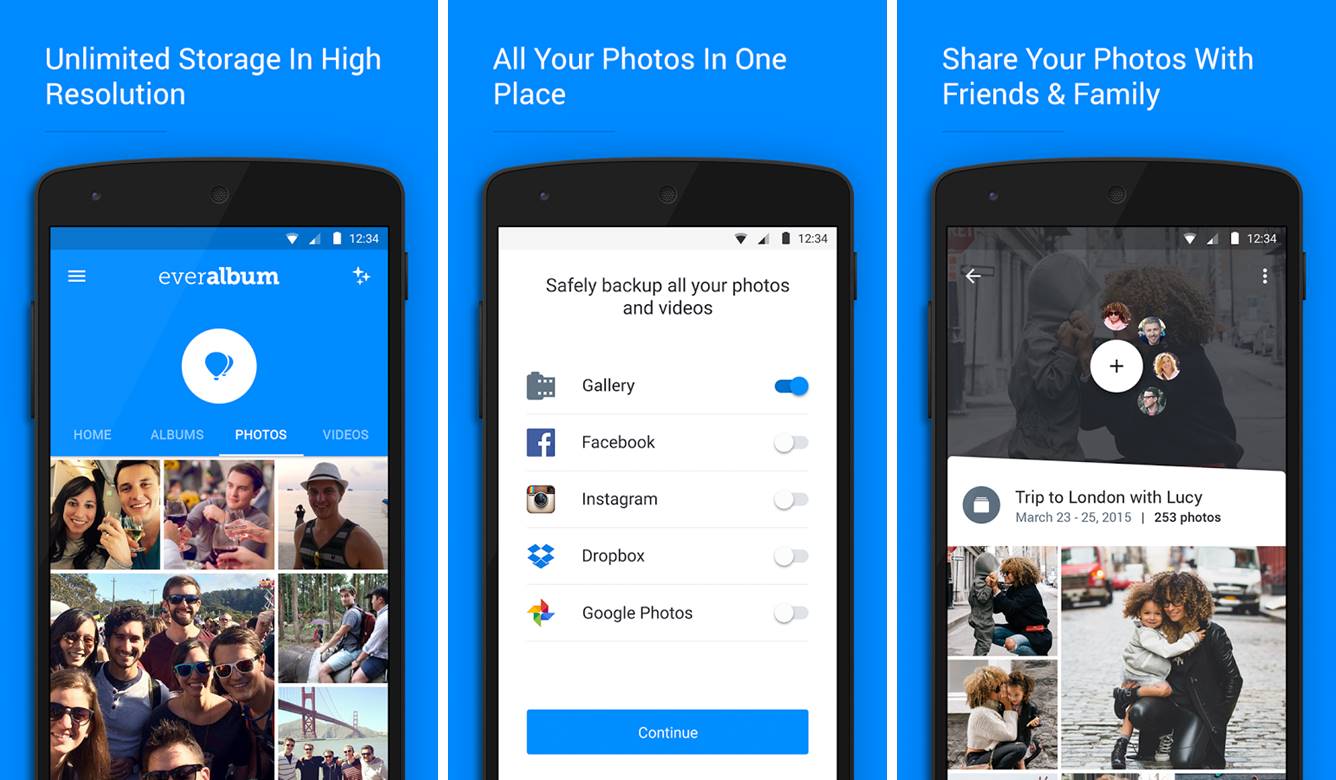
Everalbum protects your life's photos so you never have to worry about losing them. Across devices and photo sources, Everalbum automatically backs up your photos and videos so you can access them at any time. You can then free up space on your device by removing photos from your camera roll.
UNLIMITED STORAGE
- Free storage for high-resolution photos from your device's camera roll
- Easily import photos from Facebook, Instagram, and Google Photos
- Free storage for high-resolution photos from your device's camera roll
- Easily import photos from Facebook, Instagram, and Google Photos
GET YOUR SPACE BACK
- Easily free space on your device with just a few clicks
- Make room for more photos and memories
- Easily free space on your device with just a few clicks
- Make room for more photos and memories
SECURE & PRIVATE BACKUP
- Your photos are always private until you decide to share
- Automatically back up photos on your device, as you take them
- Your photos are always private until you decide to share
- Automatically back up photos on your device, as you take them
SHARE YOUR PHOTOS
- Collaborate on shared albums with your loved ones
- Share your favorite moments with friends & family
- Collaborate on shared albums with your loved ones
- Share your favorite moments with friends & family
RELIVE YOUR #THROWBACKS
- Easily engage with your #throwbacks
- Rediscover and share cherished memories
- Easily engage with your #throwbacks
- Rediscover and share cherished memories

MyShake's goal is to use the sensors in your smartphone to record earthquake shaking. By developing this capability the UC Berkeley Seismological Laboratory hopes to create a dense network that could one day provide warnings prior to shaking. The data will also be used to study earthquake processes as part of our ongoing effort to reduce the impact of future quakes.
Thanks For reading ..Please share the app you guys find interesting ....you can mention it in the comment section down below....I would love to share Your apps ... with your names .. THank You!
Friday, 4 March 2016
Hurry Up for A Bonus app ! last two days !

Hello Guys this post is just to remind you all regarding the BONUS APP i mentioned in one of my post... well if you haven't read about it yet then go ahead and click here to read it!

Last two days for All those who really want that Bonus app !
to get that bonus app .. ALL you need to do is just
Subscribe to my blog and you can add me to your circle also...All those of you have already done! need not to worry ...you will get the app by 6th of March !!
Thanks all.
Wednesday, 2 March 2016
3 best Fitness apps for Android! 2016
Hello!! ... In this post I'm going to tell you about some real cool apps which will help you during your workout and even after that also. As we see most of us wants to stay fit and fine have dream body ... and we just want to maintain ourselves .....Most of the guys wants to have Six Pack Abs.... girls want that real sexy body... so this post is all of you people!!!

1. C25k - 5k Running Trainer -

★ The OFFICIAL C25K® (Couch to 5K) program ★
- Millions of success stories!
- The only 5K training app to be partners with MyFitnessPal for seamless integration.
- Featured on Glamour Magazine, Yahoo!’s Appolicious, Popsugar Fitness, Apple’s “What’s Hot”, Apple’s “New & Noteworthy”, and many more!
- Doctor recommended on healthTap.com
≈ Real-Life Inspirational Transformations ≈
- Over 100,000 Likes and 1000 Success Photos at http://facebook.com/C25Kfree
- Our community inspires one another (and inspires us!) everyday. Hear some of their amazing stories.


1. C25k - 5k Running Trainer -

★ The OFFICIAL C25K® (Couch to 5K) program ★
- Millions of success stories!
- The only 5K training app to be partners with MyFitnessPal for seamless integration.
- Featured on Glamour Magazine, Yahoo!’s Appolicious, Popsugar Fitness, Apple’s “What’s Hot”, Apple’s “New & Noteworthy”, and many more!
- Doctor recommended on healthTap.com
≈ Real-Life Inspirational Transformations ≈
- Over 100,000 Likes and 1000 Success Photos at http://facebook.com/C25Kfree
- Our community inspires one another (and inspires us!) everyday. Hear some of their amazing stories.
Lose weight with MyFitnessPal, the world’s most popular health and fitness app! With the largest food database by far (over 6,000,000 foods), our amazingly fast and easy to use calorie counter help you take those extra pounds off! And it’s FREE – no strings attached. There is no better diet app – period.
WHAT'S NEW
It’s officially 2016 and New Year’s resolutions are in full swing. We decided that even the MyFitnessPal app could use a few healthy changes this month, so this release is full of bug fixes and performance updates. Say hello to a faster and more reliable MyFitnessPal.
We hope you enjoy and happy tracking!
Discover a new and exciting way to get motivated, lose weight, and stay in shape. Play with friends, earn rewards, defeat challenges, and track your progress on the largest fitness mobile interactive game of its kind.
Monday, 29 February 2016
Android 7.0 "N" Leaks and details

We might be months away from the release of Google's next Android OS version but a new screenshot may have offered the first look at the Marshmallow successor.
Android's official Developer site now lists a screenshot for showing Day-Night theme in system setting. Notably, the page for turning-on/ off Bluetooth includes a hamburger setting on the top left which has been so far unavailable in any of Android OS versions - indicating that it may have offered the first look at the next version.
The screenshot was first spotted by Android Police. The addition of hamburger button in Android N points to a side navigation drawer that is likely to have all Settings sections listed, making it easier to switch between them. Currently, users have to go back into main settings page before jumping to another Settings section.

Google is likely to reveal its next mobile operating system, believed to be called as Android N initially, at the I/O conference. Google CEO Sundar Pichai had last month has announced the date and venue for the I/O 2016 which will be held in Mountain View, California on May 18 through May 20. Much like Android 6.0 Marshmallow, Android N can be expected to be launched later this year with the new Nexus hardware.
Unfortunately, it's too early to comment on the design changes or tweaks that Google is expected to make in its next Android N build. But we can expect to get more of such details in bits in future.
So far, Google has revealed that Android N won't ship with Oracle's proprietary Java application programming interfaces. The company has confirmed that it will utilize OpenJDK, an open source version of Oracle's Java Development Kit.
An earlier report claimed that Google will finally include split screen multi-tasking support in Android N, the next major version of Google's operating system. Google's Andrew Bowers, Director for Consumer Hardware, had previously talking about Android N had said, "We're working on lots of things right now for N that, of course, we wish we had, you know, yesterday. But we'd spoil the surprise of N if we shared all of them. Split screen is in the works!"
GUYS Comment down below the Name you would like to give to the Upcoming Android OS...
Friday, 26 February 2016
LIVE BROADCAST to Android coming next week!!

Beginning next week, Facebook users on Android will be able to live broadcast video. The update will roll out in the United States first, with plenty more regions getting it soon after.
Facebook is adding a big feature soon that’s going to allow users to broadcast live video to friends and family for free. Facebook’s goal is to make the addition available on Android in thirty different countries to match that of iOS.
Streaming live video on Facebook is real easy to do. Just click the space that reads ‘what’s on your mind’ that you would normally click to start a post. An option will come up that allows you to share live video. Users will be able to invite whomever they want to watch, which is not limited to any number. You’ll also be able to add a brief description of what your video is about and even comment during the stream with whoever else is watching. Once the broadcast it over, you’ll be able to post the video on your timeline for everyone to see. You can check this video for an Idea!!
Live broadcasting will be a great addition to the Android-version of the Facebook application. We can’t wait to try it out!
SOURCE - FACEBOOK
Tuesday, 23 February 2016
Manage your Smartphone from desktop
No matter how advanced your smartphone is, multi-tasking on it is a living nightmare. We are limited by the small screen on a smartphone or tablet and its insistence on allowing us to use only a single app at any viewing.
It is probably easier to manage a ton of media, such as our photos, videos and music on the desktop. This is where tools like what you see in this post comes to play.

Apart from being able to transfer large files from mobile to desktop, it also allows us to better manage the files and materials in our mobile. A few of these apps even gives us access to the phone’s camera, or to take mobile screenshots from the desktop.
Most importantly, we can do all this without being limited by the different desktop OS. Let’s check out the tools you can use to manage your Android from your desktop.
1. Airmore
Airmore is an app that allows you to stream videos, photos and your music collection on your smartphone. Photos are organized by day or month to make it easy to download or delete. With Airmore, you can also manage contacts, send multiple messages at once to your contacts or even make a call (note that you cannot end the call directly from your desktop).
How to Use
- Install the app for Android or iOS. Open the app.
- Open Airmore Web on your PC browser, and scan the QR code displayed. Click "Accept" on your mobile.
- Alternatively, connection can be made via IP or code or mobile hotspot connection as well.
With Airmore, you can connect your Android to Mac, or iOS to PC as well. For troubleshooting help, check out their help page. Airmore lets you manage all files both on phone memory and SD card, and of course, transfering files between phone and PC is easy.
2. Connect Me
ConnectMe allows you to stream any video or any other media saved on your phone. You can even link to the phone camera and watch the feed from the desktop. On top of that, you can send SMS and making phone calls with ease without touch your phone. It will even notify you when someone calls you or sends you a message.
How to Use
- Install the app and open it.
- Using your home WiFi, visit the web address shown on the app or login toweb.gomo.com on your PC’s browser. Click ‘OK’ on your phone to connect.
- Alternatively, you can connect your PC to your phone’s WiFi with a name generated by the app. Open the URL shown on your phone with your PC browser.

Connect Me works with Windows, Mac, Linux, Chrome OS and even Smart TVs. The app also lets you send ringtones, clipboard data, APK files or push URLs to your phone. With root access, you can even take screenshots of your phone.
3. Airdroid
Airdroid is one of the most popularly known Mobile to PC apps out there and it comes with a plethora of features. These features include being able to show notification from incoming calls or messages, as well as app notifications from messaging apps like Whatsapp. Getting an Airdroid account allows you to find your phone.
How to Use
- Install Airdroid, and open the app.
- Open Airdroid Web and scan the QR code to connect.
- Alternatively, you can download the desktop app for Windows or Mac OS X. Starting the app on the desktop will launch the app on your mobile.

Apart from that Airdroid also works well when transferring files between phone and PC, and also lets the desktop link to the phone’s camera. A cool feature it has is AirMirror, which allows you to run your Android app right from your PC with the same interface on your smartphone (but this requires root acess on your Android).
4. Web PC Suite
Web PC Suite enables you to see and stream your photos, music, videos, documents, APK, and other kind of files from your Android to PC, via WiFi or personal hotspot. The interface functions via drag-and-drop.
How to Use
- Download the app and open it.
- Go to the website and scan the QR code there. Alternatively, you can login via your account as well.

Web PC Suite works across a wide range of desktop, mobile and tablet platforms bridging transfers between Android, iOS, Symbian, Windows Phone and Blackberry with PC, OS X and Linux.
5. Mighty Text
Mighty Text is created for those who still text via SMS for reasons we will not explore here. But basically, with Mighty Text, you can send or receive SMS or MMS on your PC using your current phone number, or send an SMS from your Gmail account. The app comes with a PowerView which lets you carry multiple conservations in one go.
How to Use
- On the installation page, insert your Android phone number to get the app sent to your phone.
- Install the plugin or extension for your favorite browser. To send text from Gmail, get the required extension on the same page.
- Launch the Web App to start using.

The app also notifies users of incoming app notification to their phone, and allow these notifications to be dismissed on the PC. The app also has syncing abilities for photos and videos, and you can add filters to your photos right on the PC.
There is a Pro version of this app gives you extra features such as to send and reply to text messages via email, changing the themes, block numbers, create templates and signatures as well as schedulling messages.
6. Xender
Xender is great app to transfer everything from files, photos, music, videos to apps between two Android phones or from Android to a PC, Mac or iOS devices. The Connect PC mode allows users to see the all the files found in their phone, from apps, photos, videos, music and even files from your phone storage.
How to Use
- On your PC browser, open web.xender.com.
- Download and open the app on your mobile.
- Tap on the Transfer button and choose which device to transfer to.
- If you choose Mac or PC, you will need to choose to scan QR code on your mobile. Scan the code to connect.

Xender’s phone to phone transfers incur no data usage, and supports file transfers between iOS and Android devices seamlessly. Two cool features Xender has is that you can create a group of up to 4 devices, and regularly share your files to the same group, and it is a great app to replicate your phone: you can transfer everything you need from your old phone to your new phone seamlessly.
7. Mobizen
Mobizen lets you access and transfer files between your Android and your computer, and lets you access all multimedia files on your phone, including contacts and calls. Mobizen also allows you to share music to your speakers and photos and videos to your larger desktop screen, record your Android screen (minus the rooting), and use your Android from your computer screen.
How to Use
- Install the application on your Android. There are two options: one forSamsung devices and the other is for non-Samsung devices.
- Get the browser plug-in.
- Log in both the Android app and the web app.
- You will receive a 6 digit pin that you need to input in the Android app to connect.

You can be connected in several ways: WIFI, USB or even 3G / LTE connection. For the fastest connection, USB connection is the best. The app runs very slowly when I connect via WiFi. Mobizen also comes with a "Find my Device" feature to help you locate your phone, which would be helpful if their over the air connection is better.
8. WiFi File Transfer
WiFi File Transfer does what the rest of the apps in this list do, but in a relatively traditional way. With this small app you can browse all of the files and folders on your Android via WiFi by FTP (File Transfer Protocol).
How to Use
- Download the app.
- Ensure your Android and PC are on the same WiFi network.
- Open the application and click "Start Service".
- Copy and paste the URL address displayed in the app, into your FTP client application, or Windows Explorer (if you are using windows) or simply open the URL in the browser. You will find all the files on your Android.

If you use an FTP client, commands such as copy, delete or download files exist on the default FTP client application. You won’t find these commands on the browser however. Basically, this app can do fast, secure and efficient transfers but you will have to do it without a user interface.
YOU CAN READ THE ORIGINAL POST HERE - http://www.hongkiat.com/blog/manage-android-via-browser/
Subscribe to:
Posts (Atom)